
This benchmark and review is to show what performance differences you can expect when you try to run a SATA 3 SSD on older hardware that only supports SATA II (300 Mb/s) connections.
I was recently looking to purchase a SSD drive as an upgrade for my old socket 775 Core 2 Duo machine to keep it alive a bit longer. This meant purchasing a current SATA 3 drive and running it connected via the on-board SATA 2 connection.
When attempting to research whether I needed an add-on SATA 3 card I was unable to find any real world reviews of this type of upgrade, so this review is designed to fill this gap.
The Rig
| Mother Board: | Socket 775, Gigabyte EP45-DS3 |
| CPU: | Core 2 Duo E8400 3.0Ghz, running overclocked @ 4.0Ghz. |
| Memory: | 4GB (2x2GB) Corsair CM2X2048-8500C5C (1066Mhz) |
| Video: | MSi R6850 Storm II 1G OC (R6850 PM2DIGD5) |
| SSD: | Corsair Force GT 120GB, (1.3.3 firmware on SATA II in AHCI mode) |
| ATA Drive: | Segate Barracuda® 7200.12 1 TB |
| OS: | Windows 7 SP1 – 64 bit |
SSD Benchmark
The SSD drive in question is a Corsair Force GT 120GB.
Full specs and details can be found here on guru3D
This is connected via the on board SATA II Connection.
The theoretical throughput is 300Mb/s. The following is the results of AS SSD.
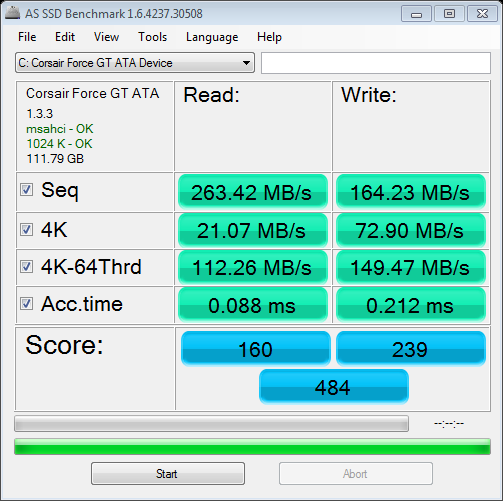
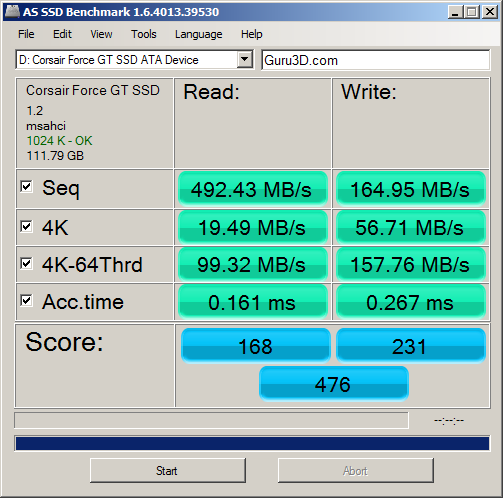
The overall score is comparable with the results from the guru 3d review with the obvious difference being the Sequential Read maxing out at 263Mb/s.
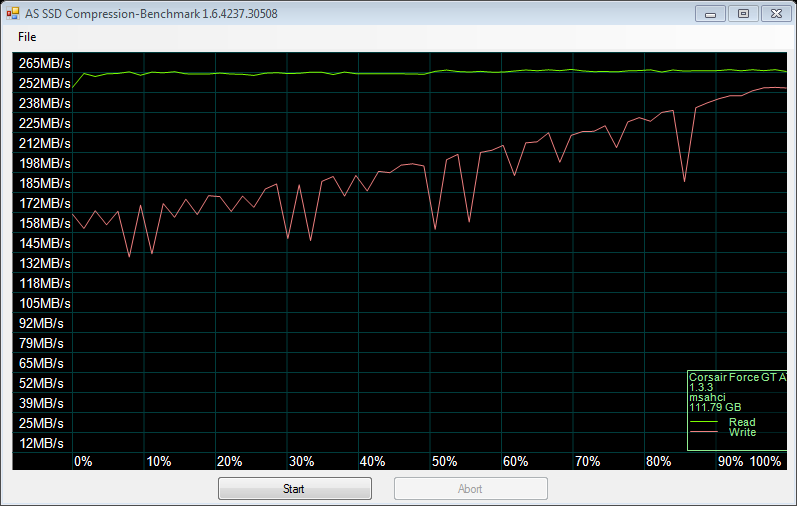
Here is the compression benchmark, so clearly the drive is not being pushed very hard..
OS Benchmark
The machine is running Windows 7 – 64bit, plus all the services and software one would expect, including:
- AVG Anitvirus
- Catalyst control centre
- HP Printer Software
- Msi Afterburner
- Core Temp
- Network and All CPU meter gadgets
The Test
This benchmark recorded the total time to startup the PC on the 7200RPM 1TB drive vs the SSD. The benchmark recorded the time from when windows started loading after the POST screen, until a working desktop was available. This was identified as the time at which the Gadgets appeared on the desktop. This was split into 4 timing points:
- time to login screen
- time to login
- time to see the desktop
- time until the gadgets loaded.
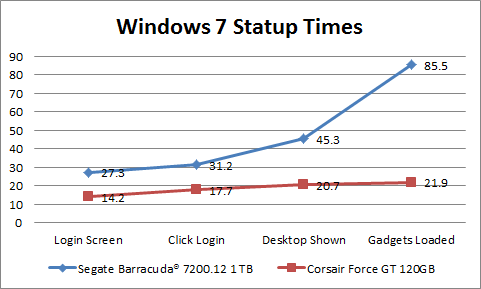
The windows startup time is now 4 times faster with the SSD drive, launching to a working desktop in less than 25 seconds, (including typing my password!)
Windows Experience Score
The windows experience went from…
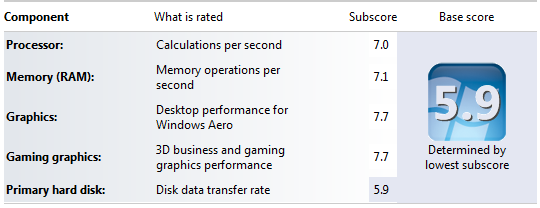
to..
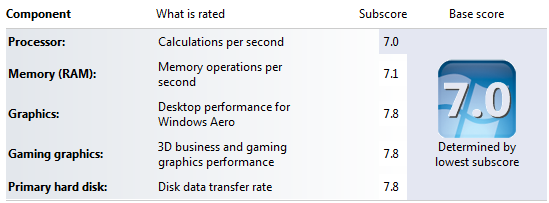
The slowest component is now my CPU.. may have to tweak that overclock 😉
Edit Caveat: Note you will have to factor in the fact that the SSD benchmark is on a clean install Windows 7 whilst the ATA Drive have been running for a while, but even so I have been using the SSD setup over the past few weeks since writing this review and start up is still very quick with only a few seconds between clicking login and being able to use the computer 🙂
Crysis
I timed the loading of the application and the loading of a new game.
With the following results.
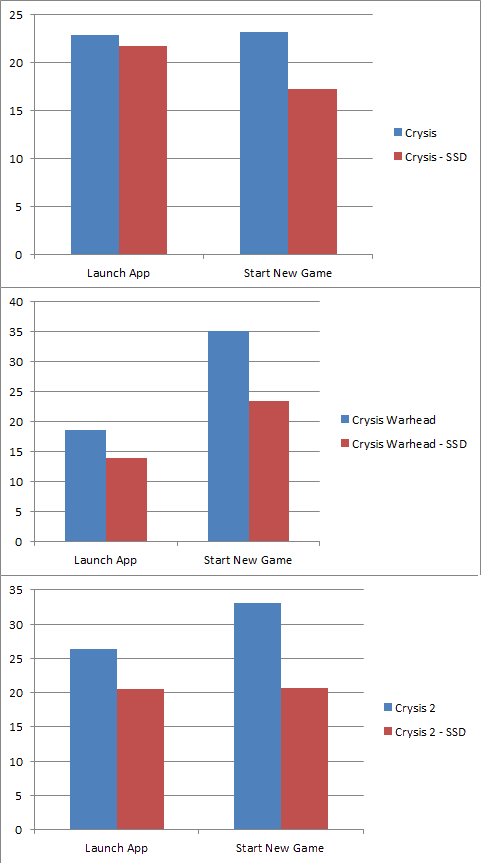
The load times were generally faster on the SSD drive and seem to have a larger performance gap as we moved from Crysis to Crysis 2.
Crysis Benchmarks
I ran both the Crysis and Crysis 2 benchmarks with no consistent pattern of improvement. The tests were within 2 fps of each other but in some cases the SSD was better and some worse. So it appears the Disk has no real impact on Crysis frame rates.
General Performance
The general performance of loading applications like Internet Explorer and Firefox, windows media centre was recorded. In most instances the load times on the SSD drive was around the 0.5 – 2.0 seconds, whilst load times on the hard drive were sometimes comparable but more often they were slower (Browsers took approx 4 seconds to load to Google homepage), but the hard drive was inconsistent in performance with load times as high as 14.5 seconds for IE being recorded.
PC Mark – Vantage (1.0.2.0)
To give some kind of industry benchmark for the entire PC experience I benchmarked the machine for overall performance using PC Mark, the results were
Hard Drive Score – 6313
SSD Score – 10683
This is a 70% improvement over the Hard drives score.
Conclusion
The general feal of the machine is much snappier with the SSD drive. Applications install really fast, open quickly and it is a nicer experience to use with no major delays when using the applications. Also I just realised my computer is also eerilly silent on start-up no more mechanical whirring and noises
I would say that it was worth the money even with just an old SATA II connection. Also this drive will be a useful addition to my Laptop at some point in the future ;-).
SATA 3 add-on Cards
The next stage of this benchmark test will be to get my hands on a SATA 3 card like the ASRock SATA 3 card or the ASUS U3S6 and see if these cards actually provide any performance benefit, stay tuned…
EDIT: 24-Feb-2012 – Asus U3S6 Review – Benchmark Sata 2 add on card >>>
EDIT- 15 march 2012
SATA 3 SSD with no AHCI?
Neville asked…
How much of an impact does AHCI have...
Can you do a quick AS SSD test with AHCI turned off??
So here it is.
Synthetic benchmarks
On AS SSD I did 3 runs on with both AHCI on and AHCI off (IDE)
With AHCI on I got the following results:
- 158 / 209 – 449
- 158 / 173 – 413
- 158 / 184 – 422
The best result is here
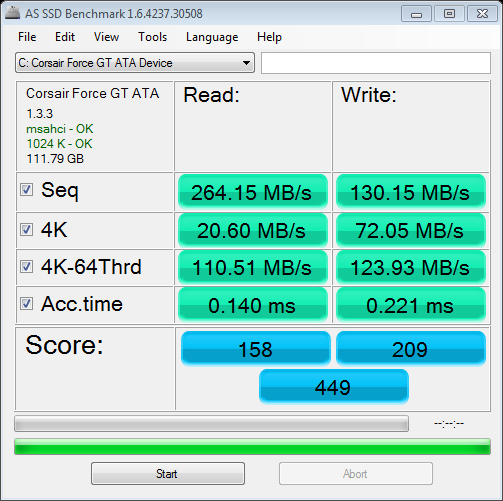
Note: similar to the later tests I did on the ASUS U3S6 you notice the read performance score is solid but the write performance is quite variable.
With AHCI off I got the following results:
- 66/158 – 261
- 68/159 – 266
- 68/171 – 277
The best result is here:
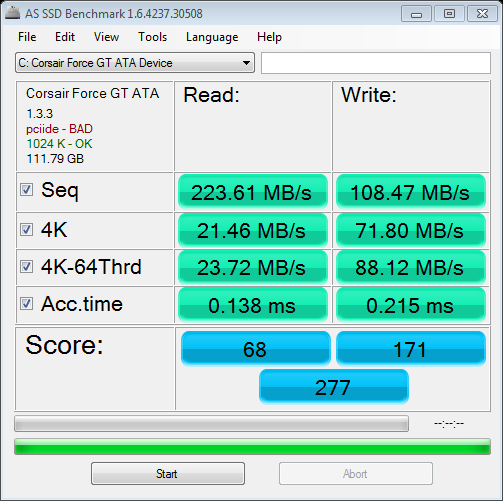
So the synthetic performance result is about 40% slower with AHCI off!!
Notice also that the 4K-64Thrd really drags the read score down, whilst all other values are comparable
Here is what Crystal Mark recorded..
With ACHI on

With AHCI Off

Note again most figures are comparable except 4KQD32.
I did some digging and found this post
What is 4KQD32 and it is described as “4k 32 queue depth. There are 32 requests in line for 4k of data”.
If you read further they suggested this is an un-realistic test for real world usage as the disk queue for windows 7 is between 1-3 normally, (all of which backs up my next statements 😉 …)
Real world performance
But again these are only synthetic benchmark figures. What did this mean to the general performance of the PC?
- Windows Experience I re-did the windows experience score and it was identical in all of the measures.
- Windows Start Up I averaged around 22.5 seconds for the boot time using the same approach to measuring startup time.
- General Feel The system seemed still quite fast to load apps and not dis-similar to running with AHCI on.
- Crysis I re-ran the Crysis Benchmarks and found that the performance was within +/- 1 fps with AHCI on or off.
So if you look solely at the synthetic benchmark things don’t look so good, (AS SSD even says its BAD – checkout the screenshot) but in the real world you will notice a significant improvement in boot times, and general speed of your PC.
As an example I have a work laptop that is a Lenovo ThinkPad with a Centrino processor and it has always performed really well and I couldn’t work out why it was so good with such a small CPU in it. Only when I did some poking around when writing this post did I find it runs a 60GB SSD.. and it all started to make sense.
excellent review
Will this stata 3ssd work on a laptop with a sata2 port? I know it will lose speed if it works.
I would say, Yes. The drive is a 2.5 inch so it’s the correct form factor to fit in a laptop and yes you would not be using the drive to its full potential but as per my blog you would definitely see improvements in start up times, application launch times which equates to a overall snappier user experience . Let me know how you go with your laptop if you go ahead and buy one.
Awesome review!! There would be so many people in this position right now. I have done exactly what you have done and the result is excellent. It will allow me to keep my current Socket 775 Quad Core system for a while longer. This will enable the prices of the Socket 2011 gear to fall in price for an upgrade later in the year.
Thanks, and if you buy right with your SSD, it will perform even better when you do eventually upgrade to a MotherBoard with SATA III :-), win, win..
Awesome. I am about to buy an OCZ vertex 3 and saw your review. It has made me really want to wait for you review on the SATA3 card!
Excellent review, it reminds me of what the web was like 10 years ago! GOOD!
I’m in the throws of getting my hands on a second hand ASUS u3S6, (hopefully in then next 5 days) This is a x4 card which runs a marvell chip for the Sata 3 on pci-e 2.0. I have a spare x8 pci-e 2.0 slot which is use in ATI cross-fire (which I don’t run). So I will hopefully be able slot the U3S6 in there and see how it improves the benchmark, what happens to TRIM support, does running on the PCI-e bus have an impact on the Video card when running Crysis, and the general startup benchmark. watch this space…
@jcrawfor74
Just posted my SATA 3 card review.
https://ntsblog.homedev.com.au/index.php/2012/02/23/asus-u3s6-review-benchmark-sata-3-add-on-card-sata-ii-onboard/
@jcrawfor74: How much of an impact does ACHI have?? Just asking my old 680i chipset mobo broke down and the only option for me in the market currently is the G41 chipset – which lacks ACHI support… Can you do a quick AS SSD test with ACHI turned off??
How’s this for service? Benchmark done. Checkout the bottom of the post for the addition of the AHCI on/off test.
I am curious about the need for the G41 chipset?
I checked it out and it runs Core2 Duo CPU’s Socket 775, so it may be the only NEW board you can buy, but check out your various online second hand trading websites (not naming names). I’m sure you can find a bargain. I got my mobo that way and has been running fine for over 2 years.
Thanks a ton! That was quick… 🙂
I’m a bit skeptical running a secondhand mobo… its not like I don’t own secondhand stuff but it usually with a lot of warranty remaining… my secondhand GPU (460GTX) had almost 2.5 yrs warranty left when I got it… and finding a P45 chipset mobo with atleast 1yr warranty would be tough…
One again thanks for that quick test… I sure these tests would be very useful for many people in a similar situation…
@jcrawfor74
This is an awesome review, exactly what I was looking for.
But I have a quick question to clear my doubts, would you recommend me an upgrade from HDD to SSD (Corsair Force 3 60 GB)?
I have G41 Chipset motherboard without ACHI and with SATA2, so I’m planning to use this SSD on SATA2 IDE mode. I know that I will lose performance on various speed tests and that stuff, but I don’t mind about breaking the records or something like that, I just wanna know is it worth the upgrade from HDD to SSD in everyday PC usage (in my machine)?
My HDD drive is currently the weakest thing in my PC (some old and very noisy Seagate 7200 RPM) and I have ASRock G41M-GS3, Q9550, 8GB DDR3 1333 Mhz and nVidia 8800 640 MB GTS. (Windows Experience Index: CPU 7.3 / RAM 7.3 / Graphics 6.7 / Gaming graphics 6.7 / Primary disk 5.8)
I’m not a gamer (was before) or something like that, just a regular user using all kinds of applications and stuff.
Would you recommend me SSD upgrare into my machine?
Thanks.
Hi, I know its a long article so you probably got bored half way through :-), but there is a section on this in the post titled “SATA 3 SSD with no AHCI?”. Another commentor asked me to benchmark with AHCI off, which I did.
My conclusion was Yes it was worth it. You are right, you won’t set the world alight with your synthetic benchmarks but in general real world usage, my startup times and user experience were comparable with AHCI on, so I would say go for it.. but thats my opinion based upon what I noticed in real world benchmarking. I’m sure you won’t be disappointed
Thanks for the advice, I’ll definitely buy SSD then. 🙂
Very enlightening! I have almost identical specs on my own rig (E8400@3Ghz, 4GB RAM, P45 MB (ASUS P5QSE) and a Radeon 4850). Now I know what to expect.
What was your mechanical disk btw? Would you happen to have its scores in synthetic benching (i.e CrystalDiskMark) to compare?
In case anyone else is interested this is my mechanical 600Gb disk benched in CDM:
http://imgur.com/qHz5r
Hi, Its mentioned in the article in a few places, but it is a Segate Barracuda® 7200.12 1 TB Drive.
I am running it still as a dual boot system, so I fired up on the old drive and I ran the benchmark.
It is comparable to yours, ATA Benchmark
Cheers
@jcrawfor74
Again, thanks. I was interested in if my mechanical disk was in the same region as others.
That 180GB Intel 520 I’ve had my eyes on is looking very interesting. 🙂
If I remember I’ll come back and post my results too.
@jcrawfor74
Many thanks for your truly enlightening benchmark.
Please answer the following question at your earliest.
Is the TRIM of Window 7 OS is working when the SATA III SSD is running on a SATA II port?
Thanks in advance
This is quite an interesting question and one that I am not sure I can answer definitively.
I have done some google searches on “How to tell is TRIM is Working” and no one seems to be able to describe, definitively how to tell if TRIM is actually working, appart from watching flashing lights on your disk.. which seems a bit vauge to me.
I can tell you, CrystalDiskInfo tells me that my drive supports TRIM, “Features: S.M.A.R.T., 48bit LBA, APM, NCQ, TRIM”.
And when I run “fsutil behavior query disabledeletenotify” I get a response of “DisableDeleteNotify = 0” which according to this forum post http://forum.corsair.com/v3/showthread.php?t=86403 tells me that TRIM is enabled.
So my drive supports it, my OS tells me its ON, so windows 7 will be sending TRIM commands, but is it actually working? Not sure?
If you have a suggestion on how to answer this I may be happy to test it.
Cheers
Excellent review and answered the questions I was going to ask. Thanks heaps!
Hi jcrawfor74
Many many thanks for such nice information..
I love the way you answer all the querries…
I want to replace my HDD by at-least 120GB SSD.
My Laptop is : HP Compaq Presario Notebook V3611AU (V3500 series)
Specs are as follows:
1) 1.8 GHz AMD Athlon 64 X2 Dual Core Processor TK-55 with 1-MB L2 Cache
2) 1600 MHz FSB featuring NVIDIA MCP67M Chipset Motherboard
3) 2-GB PC2-5300 DDR2 667 MHz SDRAM from SAMSUNG (Maximum 4-GB in 2 slots)
4) 120-GB SATA 5400 rpm HDD
5) Windows 7 Ultimate, 64bit O.S.
I was also confused about compatibility and other issues related with SSD.
e.g. SSD may die, TRIM support (deletion of file), AHCI
Kindly let me know which SSD is good for my laptop.
I would appreciate your help as I don;t know much about these things.
Thanks in anticipation.
Hi,
I have been trying to do a bit of research on your PC and I am not sure what would be your best option.
Firstly I think your chipset only supports SATA I which is only 150 MB/sec maximum transfer rate. All of the current SSD drives can support up to 500+ MB/sec speeds so one of the latest and greatest drives might be a bit of overkill for your PC.
But in saying that as you have seen on my review even at SATA II 300 MB/s I saw excellent start up time improvements, but you will most likely see some improvement in the overall experience of your laptop
I think your PC can run with AHCI, you will need to find the latest drivers online, (found this document on how to install your AHCI driver, http://h10025.www1.hp.com/ewfrf/wc/document?docname=c00758841&tmp_track_link=ot_recdoc/c00042629/en_us/c00758841/loc:3&cc=us&dlc=en&lang=en&lc=en&os=2100&product=3554086)
As far as the best drive I think it comes down to your price point. All of the drives today will out perform your PC, so I found this article on Toms hardware
http://www.tomshardware.com/reviews/ssd-recommendation-review,3194.html – Best SSD drives for the money May-2012. I assume these prices are $US.
Some good drives –
Corsair Force GT 120 – still seems to be highly rated and performs well, there is a link in my post.
SanDisk Extreme SSD (120GB) – This is a good review, but rates pretty close to the Corsair, http://hexus.net/tech/reviews/storage/36529-sandisk-extreme-ssd-120gb/
I think the pick of the bunch I was looking at was:
mushkin enhanced chronos deluxe 120gb – good reviews, but it will depend on what country you are in as I am in Australia and can seem to find a local stockist
http://www.tweaktown.com/reviews/4328/mushkin_chronos_deluxe_120gb_solid_state_drive_review/index1.html
http://www.hardwarecanucks.com/forum/hardware-canucks-reviews/45871-mushkin-chronos-deluxe-120gb-ssd-review.html
Again all of these drives will way outperform your PC and their performance will be somewhat wasted, but you can always bring this drive to your new PC in the future.
Let me know how you go
Cheers
Thanks a lot jcrawfor7 for your prompt reply with detailed information.
I am currently in South Korea.
I am little bit disappointed to know that my laptop HAS SATA I support.
I expected it to have SATA II support.
Now I am little worried about whether or not to go for SSD..
Is there any other way to make way for SATAII?
I mean by any other hardware changes..
I have Express card slot. Can that be used for the purpose?
Awaiting your reply.
Thanking you again.
Best regards
As for the specs on your laptop, I could only find a single reference to your computers specs that mentioned 150 Mb/s which is SATA I. You’ve got the computer perhaps you can do some digging around in the hardware specs of the machine and see if you can confirm the SATA support. Everest Home or SiSoft Sandra might help find that out.
I think it comes down to budget. I had a peak on the Dell Korean website and seems much the same as the Australian one, in which case if you had some money saved up I would just buy an xps 13 ultrabook or similar. You would get your 128 GB SSD thown in plus Core i5 and 4GB of memory. Online price today was 1,200 AUD which is 1,400,000 KRW.
However, given that you are just looking at an SSD, I would think perhaps budget is the issue.
Its a laptop so its not like you can just thow in a PCIe card and the Express slot does not seem to be an option as you would want internal connectors which don’t seem to exist.
So your options are to buy a cheap SSD because it will still out perform your laptop, buy a good SSD with the idea of using later when you upgrade or save up and upgrade.
Sorry I can’t be of more help.
Perhaps someone else reading this might have an opinion.
Good Luck
@jcrawfor74
Thanks a lot for your reply.
As the Win 7 OS is indicating TRIM is On, then we can safely assume that TRIM function is working when SATA SSD III is running in a SATA II port.
Thanks again jcrawfor74 !!
I downloaded the programs suggested by you and retrieved the information of laptop.
But I still confused as to where to find the information about SATA type..
I used SiSoft Sandra and checked information under Onboard Devices for Mainboard..
There are several parameters…
Which parameter shows the information regarding SATA type?
System buses or Disk controller?
Awaiting your reply.
Thanks.
Hi,
I just downloaded SiSoft Sandra.
Mine said G2 / SATA 300
SATA600 = SATA 3
SATA300 = SATA 2
SATA150 = SATA 1
Cheers
This article (+ the sata3 pcie card one) was just what I was after.
I’m running similar old specs (e8500, ep45-ds3l, hd4850, 4gb) and looking for an ssd for a quick upgrade.
about to head over to MSY to grab an intel 330 120gb.
Thanks mate
Thanks jcrawfor7!!
It is very informative..
I checked out to know that it supports SATA150..
Now i am in dilemma..
Whether to go for SSD or not..
Big Question for me..
OCZ Agility 3 series (SATA3) is for 110 $
http://tinyurl.com/SSDSATA3
Shall i go for it?
Thanks and regards
Thanks, this is really helpful. I am considering the same upgrade and this has clinched it for me.
@ jcrawfor7
After reading you very informative benchmark on sata 3 ssd funning on sata 2 port I have purchased a sata 3 ssd (ADATA SX 900 64 gb ) and using it for more than one month.
I have tested this SSD 3 on two different computers with AHCI on and 4k aligned. One is notebook having inteli 965gm mobile mobo with sata 300 port, 4 gb ram, 1.4 Core2Duo CPU and another is desktop having Gigabyte mother board GA-880GM-USB3, AMD Athlon(tm) II X4 645 Processor, 3100 Mhz, 4 Core(s), 4 GB DDR 3 ram.
But the problem is in both cases the sequential write speed is around 80 MB/s where as the sequential read speed is around 260 MB/s which conforms your benchmark.
I have written to ADATA regarding this dismal sequential write speed. They replied they have no benchmark for SATA II port for this SATA III SSD. Again I have tested a mechanical hard drive on the desktop having Gigabyte mother board GA-880GM-USB3, AMD Athlon(tm) II X4 645 Processor, 3100 Mhz, 4 Core(s), 4 GB DDR 3 ram which gives around 100 MB/s sequential write speed. I have sent my comparison of sequential write speed (ADATA SX 900 64GB SSD – aound 80 MB/s VS Mechanical Hard disk- around 100 MB/s) to ADATA with system information on 4th august. But they have not replied yet.
Therefore I need your view on whether this dismal sequential write speed of adata sx 900 64gb ssd is due to defective nand chips of the ssd? As both ADATA SX 900 64GB and your benchmarked Corssair GT are using the same controller i.e. sandforce SF-2281.
Thanking you.
P.S. Any suggestion from any member is welcome.
I’ll start by saying I do not consider myself an expert by any stretch on this topic, but I have a few ideas.
Obviously the best test to do would be to find a friend with a spare SATA III port on his computer and run the benchmark to see what the best reported sequential write speed will be. If it is significantly improved then it’s not the drive, if its similar then maybe there is a problem.. but read on.
I tried to find a benchmark on your drive and found these two of interest:
http://icrontic.com/article/adata-sx900-ssd-review
This one has a Crystal Disk benchmark on a sata III machine which shows only 97.51 MB/s write speeds! This is in the same ball park as yours on SATA II.
he doesn’t say what size drive he benched but the picture is of a 64GB.
http://www.anandtech.com/show/5710/the-adata-xpg-sx900-128gb-review-maximizing-sandforce-capacity/6
Even thought this si the 128GB version this article raised a few interesting points:
1. The AS-SSD benchmark uses incompressible data for all its tests which “The result is a pretty big reduction in sequential write speed on SandForce based controllers”.
2. On page 6 (as linked to), it provides a comment on TRIM and performance over time.
I think this may be where your issue could be coming from. I assume that with only a 64GB drive that it would be @ 60-70% capacity with the OS and a few programs installed. The thing to note that without TRIM, after excessive usage the drive performed very poorly but after a TRIM benchmarked much better.
I wonder are you using Windows 7 and do you have TRIM enabled? One possiblity could be that your drive, heavily loaded with data and TRIM not enabled is not performing optimally.
Another benchmarking option would be to re-install a clean OS and benchmark. As you can see on the Anandtech article and on my benchmarks the best result will be returned on a new clean drive versus one that has been used heavily, as the performance will drop off over time.
Finally, one question for you. Even though the benchmark scores are relatively low on the sequential write, how does the computer perform? Have you seen significant improvements in boot times and general usability? I think my article shows that benchmarks aren’t everything.
Interested to hear how you go.
One final thing, this link provides some good recommendations about how to setup your computer to increase the life and performance on your SSD.
http://www.guru3d.com/article/adata-sx900-256gb-ssd-review/6
It explains TRIM and why not to run defrags.
@jcrawfor74
Although I haven’t got around yet to buy an 520 SSD to my home system (or by now the 330 looks like a much better deal for us SATA II owners) I inherited an Intel 320 300GB (not a Sandforce chipset btw).
My workstation is not a fancy machine (Dell Optiplex 745, C2D E6400 @ 2.13Ghz, , Q965 chipset, 8GB RAM), but it actually turned my sluggish system into something very snappy system!
Behold, the change 🙂
http://imgur.com/a/mW29E
I had a soft raid in windows 7 with two oldish disks, so a modern mechanical disk would have outperformed my old raid.
Any SSD on an older machine will probably seriously change its performance.
Thank you so much for this review. This is EXACTLY what I was looking for! I am now buying a SATA III SSD for my SATA II motherboard based on your findings. Thank you again.
Thanks man – for an awesome review. I put in a PNY 120GB SSD Sata 3 drive into my ageing Lenovo ThinkPad X201 3249-CTO laptop to get a significant performance boot with Windows 10. Previously on a 7200rpm drive it was getting frustrating to use – even with 8GB of RAM.